Thursday, 20 November 2014


3D INTERNET

                    Also known as virtual worlds, the 3D Internet is a powerful new way for you to reach consumers, business customers, co-workers, partners, and students. It combines the immediacy of television, the versatile content of the Web, and the relationship-building strengths of social networking sites likeFace book . Yet unlike the passive experience of television, the 3D Internet is inherently interactive and engaging. Virtual worlds provide immersive 3D experiences that replicate (and in some cases exceed) real life..
Introduction of 3D Internet
The success of 3D communities and mapping applications, combined with the falling costs of producing 3D environments, are leading some analysts to predict that a dramatic shift is taking place in the way people see and navigate the Internet.The appeal of 3D worlds to consumers and vendors lies in the level of immersion that the programs offer. 

The experience of interacting with another character in a 3D environment, as opposed to a screen name or a flat image, adds new appeal to the act of socializing on the Internet.
Advertisements in Microsoft's Virtual Earth 3D mapping application are placed as billboards and signs on top of buildings, blending in with the application's urban landscapes.

3D worlds also hold benefits beyond simple social interactions. Companies that specialize in interior design or furniture showrooms, where users want to view entire rooms from a variety of angles and perspectives, will be able to offer customized models through users' homePCs .
Google representatives report that the company Google is preparing a new revolutionary product called Google Goggles, an interactive visor that will present Internet content in three dimensions. Apparently the recent rumors of a Google phone refers to a product that is much more innovative than the recent Apple iPhone.
Google's new three dimensional virtual reality :
nyone putting on "the Googgles" - as the insiders call them - will be immersed in a three dimensional "stereo-vision" virtual reality called 3dLife. 3dLife is a pun referring to the three dimensional nature of the interface, but also a reference to the increasingly popular Second Life virtual reality.
The "home page" of 3dLife is called "the Library", a virtual room with virtual books categorized according to the Dewey system. Each book presents a knowledge resource within 3dLife or on the regular World Wide Web. If you pick the book for Pandia, Google will open the Pandia Web site within the frame of a virtual painting hanging on the wall in the virtual library. However, Google admits that many users may find this too complicated.

Apparently Google is preparing a new revolutionary product called Google Goggles, an interactive visor which will display Internet content in three dimensions.
A 3D mouse lets you move effortlessly in all dimensions. Move the 3D mouse controller cap to zoom, pan and rotate simultaneously. The 3D mouse is a virtual extension of your body - and the ideal way to navigate virtual worlds like Second Life.
The Space Navigator is designed for precise control over 3D objects in virtual worlds. Move, fly and build effortlessly without having to think about keyboard commands, which makes the experience more lifelike.

Controlling your avatar with this 3D mouse is fluid and effortless. Walk or fly spontaneously, with ease. In fly cam mode you just move the cap in all directions to fly over the landscape and through the virtual world
Hands on: Exit Reality:
The idea behind ExitReality is that when browsing the web in the old-n-busted 2D version you're undoubtedly using now, you can hit a button to magically transform the site into a 3D environment that you can walk around in and virtually socialize with other users visiting the same site. This shares many of the same goals as Google's Lively (which, so far, doesn't seem so lively), though ExitReality is admittedly attempting a few other tricks.
Installation is performed via an executable file which places ExitReality shortcuts in Quick Launch and on the desktop, but somehow forgets to add the necessary ExitReality button to Firefox's toolbar . After adding the button manually and repeatedly being told our current version was out of date, we were ready to 3D-ify some websites and see just how much of reality we could leave in two-dimensional dust.


Exit Reality is designed to offer different kinds of 3D environments that center around spacious rooms that users can explore and customize, but it can also turn some sites like Flickr into virtual museums, hanging photos on virtual walls and halls. Strangely, it's treating Ars Technical as an image gallery and presenting it as a malformed 3D gallery .

3D Shopping is the most effective way to shop online. 3DInternet dedicated years of research and development and has developed the worlds' first fully functional, interactive and collaborative shopping mall where online users can use our 3DInternet's Hyper-Reality technology to navigate and immerse themselves in a Virtual Shopping Environment. Unlike real life, you won't get tired running around a mall looking for that perfect gift; you won't have to worry about your kids getting lost in the crowd; and you can finally say goodbye to waiting in long lines to check out.


Sunday, 9 November 2014


Back up your PC's files for free with these 3 tools


Regular backups are often the only thing that can save your bacon when a hard drive failure or otherwise catastrophic PC meltdown occurs. If your files go poof, they're gone forever unless you've safely stashed copies elsewhere.
You would ideally have at least two back-ups: one kept at home and one stored off-site—a feat that’s easily done with cloud solutions like Backblaze or CrashPlan. There are also various kinds of back-ups you can do like system images that include your files and an OS backup.
But today we’re going to focus on a trio of free, automated tools to back up just your personal files to an external hard drive or other PC—because that’s really the most critical stuff you want to save. PCs and their operating systems can be replaced, but treasured photos of your kids or accounting documents? Not so much.
For all of these tools we’re going to assume your PC is connected to an external hard drive.

Built-in and dead easy

filehistory
The most obvious choice is to use File History, a tool that comes built-in to Windows 8 and 8.1. File History is very much like Time Machine for the Mac, just without all the space traveler graphics. It saves chronological versions of your Windows libraries (documents, music, pictures, and videos), allowing you to go back in time and retrieve specific versions of a file—a handy feature if you want to retrieve a long-deleted section of a document.
By default, File History backs up your documents every hour, but you can change that under Advanced settings.
To get started with File History in Windows 8.1, connect your external drive, then open the Control Panel by right-clicking the Start button and selecting Control Panel.
Make sure the drop down menu in the upper right corner says View by: Large icons. Then just choose File History in the main Control Panel window.
On the next page, click the button labeled Turn on and you’re good to go. If you need to configure File History, look at the links on the left side of the Control Panel screen to specify folders to exclude, select a specific attached drive, and so on.
The only thing with File History is that it won’t grab anything outside your libraries, such as Outlook data files.

SyncBack Free

profile folder
SyncBack Free
A solid third-party option is the free version of SyncBack from 2BrightSparks. With this desktop app all you do is create a new backup, give it a profile name, decide on the type of back-up you want, choose your source and destination folders, and away you go.SyncBack Free lets you schedule times to run your backups via the built-in Task Scheduler in Windows.

Digging into the command line

If you’re not afraid of getting your hands dirty on the command line then try the Rsync utility via Cygwin, a Linux-style command line for Windows.
Rsync is a do-it-yourself option since you’ll have to decide on the commands you use. But the appeal of Rsync is that it’s been around for years, is very solid, and isn’t subject to radical change. In other words, it’s really boring and does its job—which is exactly what you want in a backup utility.
Truth be told, using Rsync isn’t that hard. In fact, you can get it working with just one line of code. I use Rsync for my own backups with this simple instruction on the Cygwin command line:
rsync -auv “/cygdrive/c/Users/[user folder name]/“ “/cygdrive/d/Rsync”
Basically, what this says is start Rsync, copy my entire user folder but only new files or files that have changed, and don’t erase anything. The last little bits that start with “cygdrive” tell Cygwin and Rsync which drives to copy (my entire user folder) and where to copy it to (Drive D:/).

Tuesday, 28 October 2014

Top 5 Cloud Service Providing companies


Cloud computing is Hot, it's the biggest IT trend of last few years and will continue to grow strong in coming future. Cloud computing provides several not-so-easy-to-ignore advantages, especially to public and small enterprises, which cannot afford to own and maintain expensive data centres. Since most of online business now days need high avaibility, scalability, and resiliency, with-in quick time, it's not possible to achieve all these by your own, and cloud computing becomes a best alternative here. Cloud service providers like Amazon Web Services (AWS) has helped several firms to remain focus on their business, without worrying for IT and infrastructure too much, this has yield big result for them. Not to forget cost effectiveness of cloud computing compared to your own hardware, software and data centres, and with increased competition and awareness of this business, cost is only going to south to make it even more appealing for public and small companies. There are lots of cloud service providers coming up, with increased focused on leveraging expensive data centres to full, many big companies who owns cloud infrastructure are making foray into cloud computing business. In this list, we will see learn 5 Cloud computing companies, which are either market leader or has potential to be a dominant market player. This list includes companies like Amazon, Google etc. If you are a programmer and think that there is no point knowing about cloud computing or not at-least about these cloud computing companies, you are wrong. As an IT professional, one should know about latest technologies and what is going around, when you grow in your career or forms a start-up, your general knowledge of cloud computing and IT platform, infrastructure will help a lot.

Amazon Web Services (AWS)

Amazon's cloud offering, popularly known as AWS is probably the biggest cloud computing company at this time. It is world leader in two of most popular forms of cloud computing Infrastructure as a Service (IaaS) and Platform as a Service (PaaS). Recently AWS announce its move to China, which is going to bring pace to cloud computing industry in world largest economy. Originally started to improve utilization Amazon's expensive data centres, cloud computing is quickly becoming the big revenue driver for company. Amazon built it's cloud infrastructure to support it's well known E-commerce business, but realized later potential in cloud computing. Sometime back Jeff Bezos, the founder and chief executive officer of Amazon, has acknowledged that cloud computing could be the Amazon's biggest business in the future as the demand for cheap computing and storage power keeps rising. Amazon web services is a quite matured cloud-computing Service Provider and it will definitely help to grow this trend in near future.


Google Compute Engine

  Google Compute Engine(GCE)is biggest threat to Amazon's AWS. Though it remains in limited preview and don't support Windows yet, it could completely change the cloud computing game, if Google chose to. They are very similar to Amazon's AWS but in some respect they even beat them; Like Amazon, Google's cloud infrastructure is built to support their own business mainly for Google Search, Gmail and other products. "In the public cloud, it's going to come down to Google and Amazon," said Floyd Strimling, formerly a technical evangelist at IT monitoring software provider Zenoss, which has a partnership with Google for integration with Google Maps as a visualization tool. "Just like Amazon, they're all in," he said. Google also owns fiber-optic networks, unlike Amazon, which rely on ISPs. Google has been ahead of the software-defined networking (SDN) game as well, and can compete with Amazon on pricing and performance right out of the gate. Fortunately for Amazon, Google has not shown any aggressive intent to dominate cloud computing market yet, but we expect it happens sooner than later, given current IT trends and cost effective advantages of cloud computing.

Top 5 Cloud Service Providers Java IT professionals should know

CloudBees

  CloudBeesis relatively new entrant in cloud computing space and focusing on Java Paas and Continuous delivery area. Unlike many other Platform as a Service vendors, CloudBees seems to be committed on Java, Grails and JRails. Apart from Platform as a Service, CloudBees offers continuous integration services through its Jenkins plugins and also has tie-ups with a number of ecosystem partners, e.g. New Relic for monitoring and PaperTrail for log sequencing. CloudBees seems to be rightly place for small scale companies and start-ups which makes heavy use of Java and open source technologies e.g. GitHub, Jenkins and other third party libraries. The Jenkins plugin is also used by Google App Engine.

Rackspace

  Rackspace is another growing cloud computing company in Infrastructure as a Service (IaaS) and Platform as Service (Paas) space. Rackspace has played a significant role in developing and shaping OpenStack, the much talked about open source cloud software. It has started offering public cloud service based on OpenStack from August 2012, setting the environment for other major cloud service providers to follow. It still has a long way to go, to even close of Amazon's AWS, but if it continues to broaden to its IaaS managed cloud service offerings as well as evolve to its Pass products for the buzzing DevOps market, it has bright future ahead of him.

CloudSigma

  cloudSigmais a company which thinks that the currently available public clouds are a lot more restrictive than it should be and it aims to facilitate a more flexible and collaborative relationship between public cloud providers and customers. They are not as big as Amazon AWS or Rackspace, market leaders of Infrastructure as a Service (IaaS) offering, but aims to provide an alternative close to customers. The a la carte, or utility, approach to IaaS to configure  CPU performance, RAM size, storage size will surely attract many more customers in the future.

That's all on this list of some of the top five cloud computing companies and service providers, particularly for Java and IT professionals. Many companies are in business of providing  Infrastructure as a Service (IasS) and Platform as a Service(Pass), but there are also companies which provides Software as a Service. Cloud computing is all set to take a big leap this year, and we are likely to see increased competition, reduce price and more attractive packages for using clouds. As IT professional, we should know how IT infrastructure landscape is changing, knowledge of current technology and trends also helps to develop good rapo among peers and colleagues. In 2014, Invest some time to learn about technical changes which can create big impact.

Thursday, 16 October 2014

ANDROID LOLLIPOP

Android 5.0 "Lollipop" is a version of the Android Mobile Operating System developed by Google. Unveiled on June 25, 2014, the operating system will be first made available in November 2014 for selected devices that run distributions of Android that are serviced by Google, including Nexus and Google Play Edition devices.

     The most prominent changes in Lollipop include a redesigned user interface built around a responsive design Language referred to as "material design". Other changes include improvements to the notification system which allow notifications to be accessed from the lock screen, and displayed within other apps as banners across the top of the screen. Internal changes were also made to the platform, with the Android Runtime(ART) officially replacing Dalvik for improved application performance, and changes intended to improve and optimize battery usage.The main features of Lollipop are
Enhanced notifications
1. Android L will make notifications even better. For starters you can get them on the lock screen - and they will be automatically ordered in priority. You will be able to swipe them away like normal or double tap to open the relevant app.
2. New lockscreen
Part of the Android L redesign is a new lockscreen which will show you notifications (see above image). You'll need to swipe up to unlock (if you don't have a lock pattern or other unlock method) but you can also swipe right to launch the dialler or left to launch the camera.
3. New multi-tasking
Forget a 2D list of open apps, the new recent apps section of Android L brings a Google Now card style layout. The open apps flow on a sort of carousel and can be swiped off to either side to close them as before.
It's not working on the developer preview but some apps, for example chrome, will be able to have multiple cards in recent apps. Android L will show a separate card for each open tab.
4. New notifcation bar
The Android L notification bar looks quite different to before. It works in the same way as before so a swipe from the top of the screen grants access. There's a new layout and colour scheme.
Instead of tapping a button to access quick settings you simply swipe downwards a second time. There is now screen brightness control as standard and a new 'cast screen' icon for mirroring with a Chromecast.
5. Security - personal unlocking
Google said that security is a key element for Android and its users. A new feature will enable users to unlock their smartphone when physically near enough a device like an Android Wear smartwatch. It's a bit like cars with keyless entry.
6. Battery life - new saver mode
Better battery life is something we always want and Google promises that Android L will bring it via a new battery saving mode. Project Volta will allow developers to identify how their apps are using battery so they make improvements.
Google said that the new battery saving mode will give a Nexus 5 an extra 90 minutes of power. The battery section of the settings menu now gives more detailed information, too.
7. Performance
As we expected, Android L will support 64-bit processors and it will also support the ART software library which Google says will be twice as fast as Davik.

Tuesday, 7 October 2014

WINDOWS  10


Windows 10 is an upcoming release of the  Microsoft Windows operating system. Unveiled on September 30, 2014, it will be released in late 2015.
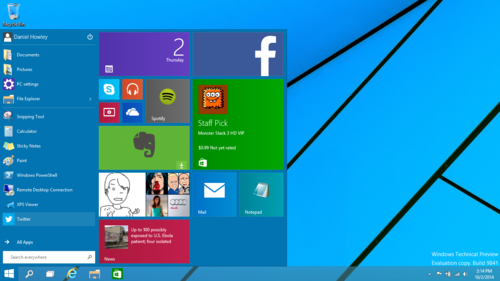
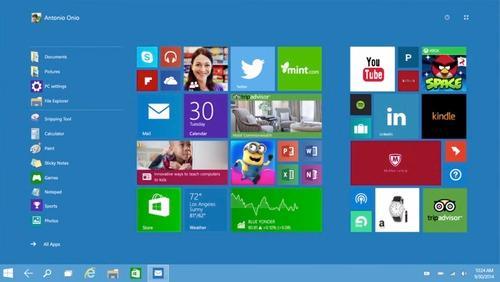
First teased in April 2014 at the Build Conference, Windows 10 aims to address shortcomings in the user interface first introduced by Windows 8 by adding additional mechanics designed to improve the user experience for non-touchscreen devices (such as desktop computers and laptops), including a revival of the Start menu seen in Windows 7, a virtual desktop system, and the ability to run Windows Store Apps within windows on the desktop rather than a full-screen mode.
These are the top reasons why Windows 10 looks like a winner for PC owners

1. The Start button is back.For years, the first thing people saw when they booted their PCs was the humble Windows Start button. But the little guy was nixed from Windows 8 in favor of the Start screen.
Windows 10 Preview: 6 Features You'll Want
With Windows 10, however, Microsoft is bringing back the Start button. You can finally see all of your programs nested in its menus, and shutting down is once again an easy click away.
What’s more, Windows 10 lets you add some of those nifty Windows 8 app tiles to the Start menu. It’s the best of both worlds.
2. The desktop returns.In Windows 8, the traditional desktop took a backseat to the Start screen. Sure, you could choose to boot to the desktop by fiddling with different settings, but the emphasis was clearly on getting people to the Start screen.
Windows 10 desktop
The Start screen interface worked well with tablets, but Microsoft wanted desktop and laptop owners to interact with the Start screen, too, even if their computers didn’t have touchscreens.
Windows 10 puts the desktop back in its rightful place, front and center as soon as you start up your computer. In fact, the touchy-feely Start screen is entirely gone from the PC version. The only remnants of the interface are the aforementioned app tiles that appear in the Start menu.
3. Continuum mode.Microsoft hasn’t completely axed the Start screen interface, though. It will still be available to people who own 2-in-1 laptop-tablet hybrid computers.
Windows 10
The feature works by recognizing how you’re using your device. So if you have a Surface Pro 3, for example, Windows 10 will run in tablet mode, emphasizing the Start screen.
Connect the Surface’s keyboard attachment, however, and Windows 10 will switch over to desktop mode and all the features it includes.
4. Windows apps.Microsoft introduced its own apps with Windows 8. And though they were beautiful, you could use them only on the Windows 8 Start screen. Windows 10 changes that, letting you open and use Windows 8 apps on the traditional desktop.
image
Better still, the apps don’t take up the whole screen anymore, because they run in actual windows, meaning that you can move and resize them as much as you want.
5. Snap your apps
Windows 8 apps on Windows 10 desktop
Windows 8’s Snap feature, which lets you move apps to either side of the screen, also returns in Windows 10. This time, though, you can snap both Windows 8 apps and regular programs to either side of your screen. It should make multitasking worlds better.
6. Task view.Windows 10’s new Task view is similar to the Mission Control feature found in Apple’s OS X. From Task view, you can open multiple desktops, each with their own apps. That should help you crank your productivity up to 11 with ease.
Windows 10 Task view
What’s more, when you move your pointer over a desktop, you can see what apps are running on it, so you don’t have to search each desktop to find where you last left off.
The outlookWindows 8 has been a headache for Microsoft, but Windows 10 is well on its way to righting its predecessor’s wrongs. Still, there’s a long way to go before this operating system is finished. We’ve only begun to scratch the surface of what Windows 10 has to offer. But from what little we’ve seen, Microsoft is on the right track.

Monday, 22 September 2014


E Ink ( Electrophoretic Ink ) Technology

               E Ink is the creator of electronic ink. You may have seen our displays in the Amazon Kindle, Barnes & Noble Nook, Novatel MiFi and many other devices. We refer to our displays as electronic paper, or ePaper. This ePaper takes the best elements of the printed page, and merges it with electronics to create a new generation of paper - a low power, instantly updateable paper - and just like your favorite book, readable even in the brightest sunlight.