Friday, 17 April 2015

Azure Service Bus

Azure Service Bus is a generic, cloud-based messaging system for connecting just about anything—applications, services and devices—wherever they are. Connect apps running on Azure, on-premises—or both. You can even use Service Bus to connect household appliances, sensors and other devices like tablets or phones to a central application or to each other.Different situations call for different styles of communication. Sometimes, letting applications send and receive messages through a simple queue is the best solution. In other situations, an ordinary queue isn't enough; a queue with a publish-and-subscribe mechanism is better. And in some cases, all that's really needed is a connection between applications—queues aren't required. Service Bus provides all three options, letting your applications interact in several different ways.
Service Bus is a multi-tenant cloud service, which means that the service is shared by multiple users. Each user, such as an application developer, creates a namespace, then defines the communication mechanisms she needs within that namespace. Figure 1 shows how this looks.
Diagram of Azure Service Bus
Figure 1: Service Bus provides a multi-tenant service for connecting applications through the cloud.
Within a namespace, you can use one or more instances of four different communication mechanisms, each of which connects applications in a different way. The choices are:
  • Queues, which allow one-directional communication. Each queue acts as an intermediary (sometimes called a broker) that stores sent messages until they are received. Each message is received by a single recipient.
  • Topics, which provide one-directional communication using subscriptions-a single topic can have multiple subscriptions. Like a queue, a topic acts as a broker, but each subscription can optionally use a filter to receive only messages that match specific criteria.
  • Relays, which provide bi-directional communication. Unlike queues and topics, a relay doesn't store in-flight messages-it's not a broker. Instead, it just passes them on to the destination application.
  • Event Hubs, which provide event and telemetry ingress to the cloud at massive scale, with low latency and high reliability.
When you create a queue, topic, relay, or Event Hub, you give it a name. Combined with whatever you called your namespace, this name creates a unique identifier for the object. Applications can provide this name to Service Bus, then use that queue, topic, relay, or Event Hub to communicate with one another.
To use any of these objects, Windows applications can use Windows Communication Foundation (WCF). For queues, topics, and Event Hubs Windows applications can also use Service Bus-defined messaging APIs. To make these objects easier to use from non-Windows applications, Microsoft provides SDKs for Java, Node.js, and other languages. You can also access queues, topics, and Event Hubs using REST APIs over HTTP.
It's important to understand that even though Service Bus itself runs in the cloud (that is, in Microsoft's Azure datacenters), applications that use it can run anywhere. You can use Service Bus to connect applications running on Azure, for example, or applications running inside your own datacenter. You can also use it to connect an application running on Azure or another cloud platform with an on-premises application or with tablets and phones. It's even possible to connect household appliances, sensors, and other devices to a central application or to one other. Service Bus is a generic communication mechanism in the cloud that's accessible from pretty much anywhere. How you use it depends on what your applications need to do.

Queues

Suppose you decide to connect two applications using a Service Bus queue. Figure 2 illustrates this situation.
Diagram of Service Bus Queues
Figure 2: Service Bus queues provide one-way asynchronous queuing.
The process is simple: A sender sends a message to a Service Bus queue, and a receiver picks up that message at some later time. A queue can have just a single receiver, as Figure 2 shows, or multiple applications can read from the same queue. In the latter situation, each message is read by just one receiver-for a multi-cast service you should use a topic instead.
Each message has two parts: a set of properties, each a key/value pair, and a binary message body. How they're used depends on what an application is trying to do. For example, an application sending a message about a recent sale might include the properties Seller="Ava" and Amount=10000. The message body might contain a scanned image of the sale's signed contract or, if there isn't one, just remain empty.
A receiver can read a message from a Service Bus queue in two different ways. The first option, called ReceiveAndDelete, removes a message from the queue and immediately deletes it. This is simple, but if the receiver crashes before it finishes processing the message, the message will be lost. Because it's been removed from the queue, no other receiver can access it.
The second option, PeekLock, is meant to help with this problem. Like ReceiveAndDelete, a PeekLock read removes a message from the queue. It doesn't delete the message, however. Instead, it locks the message, making it invisible to other receivers, then waits for one of three events:
  • If the receiver processes the message successfully, it calls Complete, and the queue deletes the message.
  • If the receiver decides that it can't process the message successfully, it calls Abandon. The queue then removes the lock from the message and makes it available to other receivers.
  • If the receiver calls neither of these within a configurable period of time (by default, 60 seconds), the queue assumes the receiver has failed. In this case, it behaves as if the receiver had called Abandon, making the message available to other receivers.
Notice what can happen here: The same message might be delivered twice, perhaps to two different receivers. Applications using Service Bus queues must be prepared for this. To make duplicate detection easier, each message has a unique MessageID property that by default stays the same no matter how many times the message is read from a queue.
Queues are useful in quite a few situations. They let applications communicate even when both aren't running at the same time, something that's especially handy with batch and mobile applications. A queue with multiple receivers also provides automatic load balancing, since sent messages are spread across these receivers.

Topics

Useful as they are, queues aren't always the right solution. Sometimes, Service Bus topics are better. Figure 3 illustrates this idea.
Diagram of Service Bus Topics and Subscriptions
Figure 3: Based on the filter a subscribing application specifies, it can receive some or all of the messages sent to a Service Bus topic.
A topic is similar in many ways to a queue. Senders submit messages to a topic in the same way that they submit messages to a queue, and those messages look the same as with queues. The big difference is that topics let each receiving application create its own subscription by defining a filter. A subscriber will then see only the messages that match that filter. For example, Figure 3 shows a sender and a topic with three subscribers, each with its own filter:
  • Subscriber 1 receives only messages that contain the property Seller="Ava".
  • Subscriber 2 receives messages that contain the property Seller="Ruby" and/or contain an Amount property whose value is greater than 100,000. Perhaps Ruby is the sales manager, and so she wants to see both her own sales and all big sales regardless of who makes them.
  • Subscriber 3 has set its filter to True, which means that it receives all messages. For example, this application might be responsible for maintaining an audit trail and therefore it needs to see all the messages.
As with queues, subscribers to a topic can read messages using either ReceiveAndDelete or PeekLock. Unlike queues, however, a single message sent to a topic can be received by multiple subscribers. This approach, commonly called publish and subscribe, is useful whenever multiple applications might be interested in the same messages. By defining the right filter, each subscriber can tap into just the part of the message stream that it needs to see.

Relays

Both queues and topics provide one-way asynchronous communication through a broker. Traffic flows in just one direction, and there's no direct connection between senders and receivers. But what if you don't want this? Suppose your applications need to both send and receive messages, or perhaps you want a direct link between them and you don't need a broker to store messages. To address scenarios such as this, Service Bus provides relays, as Figure 4 shows.
Diagram of Service Bus Relay
Figure 4: Service Bus relay provides synchronous, two-way communication between applications.
The obvious question to ask about relays is this: Why would I use one? Even if I don't need queues, why make applications communicate via a cloud service rather than just interact directly? The answer is that talking directly can be harder than you might think.
Suppose you want to connect two on-premises applications, both running inside corporate datacenters. Each of these applications sits behind a firewall, and each datacenter probably uses network address translation (NAT). The firewall blocks incoming data on all but a few ports, and NAT implies that the machine each application is running on doesn't have a fixed IP address that you can reach directly from outside the datacenter. Without some extra help, connecting these applications over the public Internet is problematic.
A Service Bus relay provides this help. To communicate bi-directionally through a relay, each application establishes an outbound TCP connection with Service Bus, then keeps it open. All communication between the two applications will travel over these connections. Because each connection was established from inside the datacenter, the firewall will allow incoming traffic to each application without opening new ports. This approach also gets around the NAT problem, because each application has a consistent endpoint in the cloud throughout the communication. By exchanging data through the relay, the applications can avoid the problems that would otherwise make communication difficult.
To use Service Bus relays, applications rely on Windows Communication Foundation (WCF). Service Bus provides WCF bindings that make it straightforward for Windows applications to interact via relays. Applications that already use WCF can typically just specify one of these bindings, then talk to each other through a relay. Unlike queues and topics, however, using relays from non-Windows applications, while possible, requires some programming effort; no standard libraries are provided.
Unlike queues and topics, applications don't explicitly create relays. Instead, when an application that wishes to receive messages establishes a TCP connection with Service Bus, a relay is created automatically. When the connection is dropped, the relay is deleted. To let an application find the relay created by a specific listener, Service Bus provides a registry that enables applications to locate a specific relay by name.
Relays are the right solution when you need direct communication between applications. For example, consider an airline reservation system running in an on-premises datacenter that must be accessed from check-in kiosks, mobile devices, and other computers. Applications running on all of these systems could rely on Service Bus relays in the cloud to communicate, wherever they might be running

Sunday, 22 March 2015

Sailfish OS

Sailfish is a mobile operating System (OS) combining the Linux Kernel, the Mer core and proprietary software written by mobile software developer Jolla. Sailfish is being developed by Jolla in cooperation with the Mer project community and corporate members of the Seilfish Alliance. Sailfish is used in the Jolla smartphone, in the upcoming Jolla Tablet, and by other licensees.The OS is mainly targeted at mobile devices and is also intended to support other devices.


The Sailfish OS and the Sailfish Software Sevelopment Kit (SDK) are based on the Linux Kernal and Mer Sailfish OS includes a multi-tasking graphical Shell called "Lipstick" built by Jolla on top of Jolla uses free and open source grpahics drive the Hybris library allows use of proprietary graphics device drivers for Android.Jolla's stated goal is for Sailfish to be open source eventually.
Sailfish OS can run Android applications through a proprietary compatibility layer.
                          
                                  
The Sailfish OS SDK was announced in Helsinki at Slush in 2012, and the alpha was published in February 2013. The SDK, installation and coding tutorials are available for free download from the Sailfish OS website although the overall license is not open source.
Sailfish SDK uses Qt with Virtual Box for development, compiling and emulation purposes, in contrast to simulation method.This technique allows compilation on the Sailfish OS and full testing of developed software in the virtual Machine, emulating but not simulating the whole Sailfish OS.The technique also separates development activities and side effects from everything else running on the host particular computer, leaving it undisturbed by developments and tests. According to Jolla, development with Sailfish SDK is development on Sailfish OS itself; there are no differences between developed software appearance and behaviour in the SDK and on a device running Sailfish OS.
The availability of source code to the SDK allows shaping and rebuilding for companies' or developers' specific needs, creating a context-specific environment that is set once and needs no preparation when the device is booted. The SDK runs on the operating systems Android-32 and 64 bit versions of Linux, 64-bit versions of OS X, and Microsoft Windows. It can be used for compiling software for Sailfish OS devices from Linux sources. Its general console/terminal mode follows a commonly used standard. A compatible binaries or libraries can also be used.
Application programming interfaces


SailfishOS uses open source Qt APIs (Qt 5, QtQuick 2 etc.) and a closed source Sailfish Silica for the UI. Standard Linux APIs are provided by the Mer Core.
Sailfish, Ubuntu and Plasma Archieve have been cooperating to share common APIs and this, when successful, will make the platforms compatible on the API level .

Monday, 9 March 2015

DARKNET


Deep Web (also called the Deepnet,Invisible Web, or Hidden Web) is the portion of World Wide Web content that is not intdexed by standard search engines.
Mike Bergman, founder of BrightPlanet and credited with coining the phrase, said that searching on the Internet today can be compared to dragging a net across the surface of the ocean: a great deal may be caught in the net, but there is a wealth of information that is deep and therefore missed. Most of the Web's information is buried far down on sites, and standard search engines do not find it. Traditional search engines cannot see or retrieve content in the deep Web. The portion of the Web that is indexed by standard search engines is known as the Surface Web. As of 2001, the deep Web was several orders of magnitude larger than the surface Web.
It should be noted that the Deep Web is a separate entity from the dark Internet, which is made up of computers that can no longer be reached via the Internet. Also, the Dark Web - which consists of various anonymizing networks like Tor and the resources that they provide access to - is not synonymous with the Deep Web, but is considered as a subsection of it..
Although much of the Deep Web is innocuous, some prosecutors and government agencies, among others, are concerned that the Deep Web is a haven for serious criminality.

What a tangled web we weave, indeed. About 40 percent of the world's population uses the Web for news, entertainment, communication and myriad other purposes [source: . Yet even as more and more people log on, they are actually finding less of the data that's stored online. That's because only a sliver of what we know as the World Wide Web is easily accessible.
The so-called surface Web, which all of us use routinely, consists of data that search engines can find and then offer up in response to your queries. But in the same way that only the tip of an iceberg is visible to observers, a traditional search engine sees only a small amount of the information that's available -- a measly 0.03 percent .
As for the rest of it? Well, a lot of it's buried in what's called the deep Web. The deep Web (also known as the undernet, invisible Web and hidden Web, among other monikers) consists of data that you won't locate with a simple Google search.
No one really knows how big the deep Web really is, but it's hundreds (or perhaps even thousands) of times bigger that the surface Web. This data isn't necessarily hidden on purpose. It's just hard for current search engine technology to find and make sense of it.
There's a flip side of the deep Web that's a lot murkier -- and, sometimes, darker -- which is why it's also known as the dark Web. In the dark Web, users really do intentionally bury data. Often, these parts of the Web are accessible only if you use special browser software that helps to peel away the onion-like layers of the dark Web.
This software maintains the privacy of both the source and the destination of data and the people who access it. For political dissidents and criminals alike, this kind of anonymity shows the immense power of the dark Web, enabling transfers of information, goods and services, legally or illegally, to the chagrin of the powers-that-be all over the world.
Just as a search engine is simply scratching the surface of the Web, we're only getting started. Keep reading to find out how tangled our Web really becomes.

Monday, 23 February 2015

Android 5.0 Lollipop

Google recently announced a new version of Android, which by the looks of it, seems far more tastier than ever before. Called the Android Lollipop 5.0, the new OS is expected to address all shortcomings of the previous versions, which users have been complaining about, including security issues. It’s not available yet, but Lollipop is expected to take the user experience to the next level, while improving the performance multi-fold. Will it be worth an upgrade, and the bigger question, will it be available on all the devices out there? Let’s take a closer look.
Sugar Rich Features
The new fresh look - It gets the new Material Design with over 5,000 new APIs ticking away behind the scenes. The colorful, bold and responsive UI is expected to offer consistent, intuitive experiences across all devices.
Animated touch object - Touch will get animation, so when you touch an icon, it animates with objects flying into view and tapped icons rippling like puddle.
Android L
Easy to navigate - It will have more realistic lighting and shadows, responsive, natural motion and familiar visual elements, which would make it easier to navigate your device. Vivid new colors, typography and edge-to-edge imagery will help you to focus your attention.
Smarter Android - The new version will allow you to control the notification system. You can decide when and how you want to receive messages/ notifications.
Response mechanism on the lock screen - You will be able to view and respond to received messages directly from the lock screen, without publicizing your sensitive messages. It has the ability to hide sensitive content.
Fewer disruption - If you don’t want to be disturbed, then turn on the Priority mode via your device’s volume button so that only certain people and notifications get through. Or schedule recurring downtime like 10pm to 8am when only Priority notifications can get through.
android-l-features-review-contacts
Interruption free entertainment - Android Lollipop gives you the freedom to enjoy videos without getting interrupted. If you receive a call, it will show you a notification to choose to answer the call or just keep doing what you’re doing.
Age-long battery life - Play with your device for a longer time as it comes with a battery saver feature which extends device use by up to 90 minutes.
Flexibility to share the device - One device can be used by several users. Lollipop allows you to share the device with your friends and family with multiple user access for the phone.
Share your device, not the stuffs - Guest users have limited access to the phones or tablets.
Handy controls and settings - Quick settings enables you to make changes in the most frequently used settings with just two swipes down from the top of the screen. And it gets handy controls to flashlight, hotspot, screen rotation and cast screen.
Android-L-screenshots-Dialler-contacts_thumb
High connectivity - It comes with improved network handoffs resulting in limited interruption in connectivity. As well as improved network selection logic enables users to connect the device only if there is a verified internet connection on Wi-Fi available.
Amazing Audio - Real-time audio experience with multi-channel audio stream mixing, so you get professional audio applications that can mix up to eight channels including 5.1 and 7.1 channels. Plug in USB microphones, speakers, and a myriad of other USB audio devices like amplifiers and mixers into your Android device as it comes with USB audio support.
Rich graphics - Lollipop gets OpenGL ES 3.1 and Android extension pack that brings the forefront of mobile graphics at par with the desktop and console class performance.
Android-l-5-contact-apk
Professional photography features - It is packed with a bunch of new professional photography features that let you capture full resolution frames around 30 fps, support raw formats like YUV and Bayer RAW, control capture settings for the sensor, lens, and flash per individual frame and capture metadata like noise models and optical information.
Play UHD 4K videos on your device - State-of-the-art video technology with support for HEVC that allows you to play UHD 4K video. Convert your living room into a smart zone Android TV is integrated into Lollipop that supports living room devices and allows you to get games, videos, photos, TV shows etc. onto your big screen.
It also allows voice search for Google Play, YouTube and supported apps so you can just say what you want to see.
Slicker multitasking - Lollipop comes with the all-new 3D card-style view that fosters multitasking with ease. Flick through different apps, like a virtual Rolodex.
Devices That Get Android L Update First
Moto G or Moto X (all generations) and Moto E will get Lollipop update later this year. Sony Xperia Z range will get the update from Google. HTC One M8 or M7 will get the update within 90 days of getting the final version of Android L from Google and then later on other ‘One’ smartphones will get the update.
There is no official announcement yet from Samsung, but it is expected that all current Galaxy smartphones will be updated, though according to a tweet from the firm, the Galaxy Note 4 will get the update. LG commented on their German Facebook page that G3 and G2 will get the update. Meanwhile, the G Pad 8.3 will be updated alongside Google’s own Nexus range.
How secure is the new Android Lollipop?
Google has put a lot of effort into addressing the Android user security. The biggest roadblock to mobile device security is actually user apathy, which sees people skipping basic security practices like implementing a lock screen pin code.
Some new Lock methodology
Smart Accessibility: Lollipop offers Smart Lock that allows you to use paired devices to access your device without requiring a password or other means of authentication. You can set it up by using any NFC or Bluetooth-enabled device that has been paired with your Android L smartphone or tablet. The pairing requirement adds a layer of security, meaning your smartphone won’t unlock if you happen to be near an NFC terminal you’ve used for an in-store payment some time in the past.
Face unlock: Google’s face unlock analyzes user’s image continuously, as more of a background security process than a device unlocking mechanism. It captures minor changes in the facial looks, e.g. a moustache or a beard.
Automatic whole phone’s data encryption - In Lollipop, when you power on a new smartphone or tablet, it encrypts all data automatically, and creates a unique key that remains on the device to decrypt the data. It’s enabled by default, at the beginning of device set-up.
Enhanced security with SELinux - By using Security Enhanced Linux (SELinux), Google is enabling even further clarity around the isolation of individual apps. This means that users have to worry less about apps containing vulnerabilities that allow them to read info from other apps.
The unmatched performance of Android L
Google promises that the new version would offer a faster, smoother and more powerful computing experience. “ART’, an entirely new Android runtime, improves application performance and responsiveness. With this, devices’ performance would increase by up to 4x. Users would experience smoother UI with it. It is compacting background apps and services so that you can do more at once. Visually rich OS supports 64-bit devices like the Nexus 9, 64-bit SoCs using ARM, x86, and MIPS-based cores, shipping 64-bit native apps like Chrome, Gmail, Calendar, Google Play Music, etc. and pure Java language apps would run as 64-bit apps automatically on it.

Sunday, 8 February 2015

LINUX VIRTUAL SERVER

Linux Virtual Server (LVS) is load balancing software for Linux kernel–based operating systems.
LVS is a free and open source project started by Wensong Zhang in May 1998, subject to the requirements of the GNU public license (GPL), version 2. The mission of the project is to build a high-performance and highly available server for Linux using clustering technology, which provides good scalability, reliability and serviceability.

The major work of the LVS project is now to develop advanced IP load balancing software (IPVS), application-level load balancing software (KTCPVS), and cluster management components.
  • IPVS: an advanced IP load balancing software implemented inside the Linux kernel. The IP Virtual Server code is merged into versions 2.4.x and newer of the Linux kernel mainline.[1]
  • KTCPVS: implements application-level load balancing inside the Linux kernel, as of February 2011 still under development.[2]
LVS can be used for building highly scalable and highly available network services, such as web, email, media and VoIPservices, and integrating scalable network services into large-scale reliable e-commerce or e-government applications. LVS-based solutions already have been deployed in many real applications throughout the world, including Wikipedia.
The LVS components depend upon the Linux Netfilter framework, and its source code is available in thenet/netfilter/ipvs subdirectory within the Linux kernel source. LVS is able to handle UDP, TCP layer-4 protocols as well as FTP passive connection by inspecting layer-7 packets. It provides a hierarchy of counters in the /proc directory.

Monday, 12 January 2015


 Mota Smart Ring

Balancing work and life is never easy. Smartphones promised to help, but they've become almost too helpful. Smartphone notifications have proliferated to the point of almost being out of control. Apps, too, compete for your attention. Almost anything or anyone can use your phone to intrude on your time. The MOTA SmartRing wirelessly connects to your SmartPhone and updates you on only the notifications you want, right at your fingertips.
The MOTA SmartRing cuts through the clutter, giving you newfound freedom over your connected life. You alone decide with whom and with what you want to connect.
The Smart Ring's companion app for Android and iOS devices allows ultra fine-grained control of notifications to be displayed on the ring. Low energy Bluetooth 4.0 communications provides a stable connection between your phone and your SmartRing.
The ring lets you scroll through text at your own speed. Whoever your VIPs are, you’ll ensure you never miss another text, email, or phone call from them again!

Customize your ring to notify you only of a select few if you're crunching low on time. Expand your circle of contacts for when don't mind being in touch with the world. The MOTA SmartRing gives you back the most precious thing of all: time.  

Charging this ring is as easy as taking it off and putting it down. The MOTA SmartRing allows you to stay wire-free, charging your SmartRing via its charging station. Simply place your ring on top of the inductive wireless charging station, and let the ring top itself off.

With you in mind, we created a ring to fit your hectic schedule. Whether you are confined to your cubicle at work, or a busy parent of three getting updates from your babysitter, the ring brings you everything you need, all with a flick of a finger.
The SmartRing lets you assign specific alerts to your key contacts, so you can know who's trying to reach you without even looking at your phone.
Picture yourself in a meeting where answering a phone call would be impolite. No worries, you can customize your phone to alert you only when necessary, and read the alerts right from your ring, not even having to take out your phone. The MOTA SmartRing helps you streamline your life . Even with your phone buried in a bag or purse, you can still be updated on all your incoming text messages, right from your SmartRing.


Never lose your inner fashionista. This SmartRing initially comes in beautiful midnight black and pearl white. Its sleek simple look blends in perfectly with your look, whether you're on Madison Avenue or Venice Beach.
This SmartRing is as rugged as it is sleek, engineered to withstand day-to-day wears and tears. It's shock and water resistant and its bright screen is readable even outdoors.


Without you, the production for this ring cannot happen. But with your support, together we can bring a new level of usefulness to wearable technology. Better yet, you'll be among the first to own this SmartRing at a very special price!
Initially, the SmartRing will ship with support Android® and IOS enabled devices (e.g iPhone®) with calls, text messages, email, and calendar notification. We are also working on popular social networking notifications such as Facebook® and Twitter®. We will continue to move further if you love the SmartRing enough, where you can help us extend it to your favorite apps.
If you love the SmartRing enough, help us extend it to your favorite apps. This SmartRing is also designed to go with you wherever you go. This feather-light ring will become part of your daily life, and soon, you won’t be able to live without it!

Here is the basic functionality of the SmartRing in action shown at IFA Electronic show in Germany. Of course, the final version will not just tell you there is a text message but notify you who it is from and show the text message on the screen.

Friday, 2 January 2015


Wireless Body Area Network


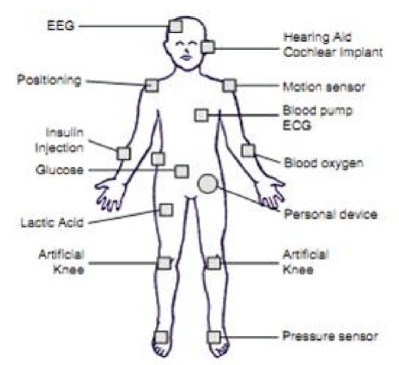
            Future communication systems are driven by the concept of being connected any-where at any time. This is not limited to even in medical area. Wireless medical communications assisting peoples work and replacing wires in a hospital are the applying wireless communications in medical healthcare. The increasing use of wireless networks and the constant miniaturization of electrical devices has empowered the development of wireless body area networks(WBANs).In these networks various sensors are attached on clothing or on thebody or even implanted under the skin. These devices provide continuous healthmonitoring and real-time feedback to the user or medical personnel. The wire-less nature of the network and the wide variety of sensors offer numerous new,practical and innovative applications to improve healthcare and the quality of life.The sensor measures certain parameters of human body, either externally or internally. Examples include measuring the heartbeat, body temperature or recording a prolonged electrocardiogram (ECG).
Several sensors are placed in clothes, directly on the body or under the skin of a person and measure the temperature, blood pressure, heart rate, ECG, EEG, respiration rate, SpO2 levels etc. Next to sensing devices, the patient has actuators which act as drug delivery systems. The medicine can be delivered on predetermined moments, triggered by an external source or immediately when a sensor notices aproblem. The sensor monitors a sudden drop of glucose, a signal can be sent to the actuator inorder to start the injection of insulin. Consequently, the patients will experiences fewer nuisances from his disease. An example of a medical WBAN used forpatient monitoring.
Wireless Body Area Network
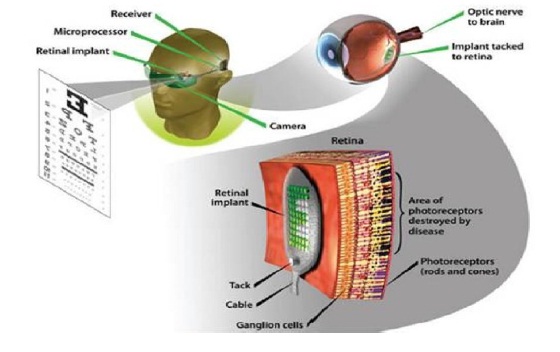
A WBAN can also be used to offer assistance to the disabled. For example, a paraplegic can be equipped with sensors determining the position of the legs or with sensors attached to the nerves. In addition, actuators positioned on the legs can stimulate the muscles. Interaction between the data from the sensors and the actuators makes it possible to restore the ability to move. Another example is aid for the visually impaired. An artificial retina, consisting of a matrix of microsensors, can be implanted into the eye beneath the surface of the retina. Theartificial retina translates the electrical impulses into neurological signals. Another area of application can be found in the domain of public safety where the WBAN can be used by firefighters, policemen or in a military environment. The WBAN monitors for example the level of toxics in the air and warns thefirefighters or soldiers if a life threatening level is detected. The introduction of a WBAN further enables to tune more effectively the training schedules of professional athletes.

Positioning WBANS
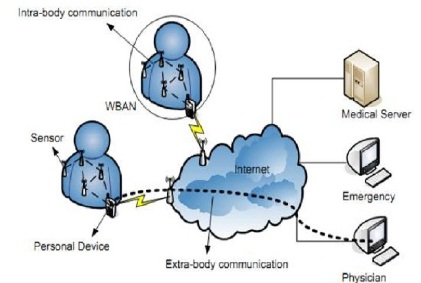
The protocols developed for WBANs can span from communication between the sensors on the body to communication from a body node to a data center connected to the internet. Thus communication in WBAN is divided into:
1. Intra body communication
2. Extra body communication
Intra-body and extra- body Communication in WBAN
Intra body communication controls the information handling on the body between the sensors or actuators and personal device. And extra body communication ensures communication between the personal devices and an external net-work . This segmentation is similar to the one defined in where a multi-tiered telemedicine system is presented. Tier 1 encompasses the intra-body communication, tier 2 the extra-body communication between the personal device and the Internet and tier 3 represents the extra-body communication from internet to the medical server. To date development has been mainly focused on building the system architecture and service platform for extra-body communication. Much of these implementations focus on the repackaging of traditional sensors (e.g. ECG, heart rate) with existing wireless devices. They consider a very limited WBAN consisting of only a few sensors that are directly and wirelessly connected to a personal device. Further they use transceivers with a large and large antennas that are not adapted for use on a body.
Positioning of a Wireless Body area Network in the realm of wireless networks
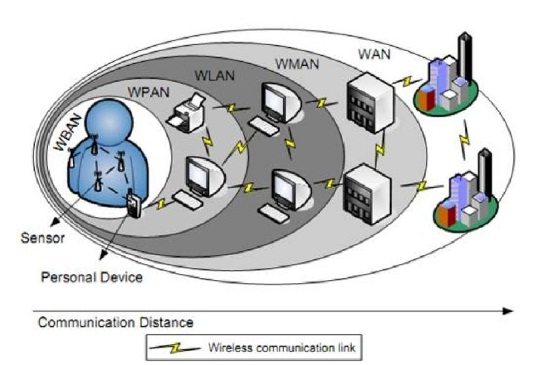
In the figure 4.2, a WBAN is compared with other types of wireless networks, such as Wireless Personal (WPAN), Wireless Local(WLAN), Wireless Metropolitan(WMAN), and Wide area networks(WAN). A WBAN is operated close to human body and its communication range will be restricted to a few meters, with typical values around 1-2 meters. While a WBAN is devoted to interconnection of one persons wearable devices, a WPAN is a network in the environment around the person.
Physical Layer
The characteristics of the physical layer are different for a WBAN compared to a regular sensor network due to the proximity of the human body. Tests with TelosB motes (using the CC2420 transceiver) showed lack of communications between nodes located on the chest and nodes located on the back of the patient . This was accentuated when the transmit power was set to a minimum for energy savings reasons. when a person was sitting on a sofa, no communication was possible between the chest and the ankle. Better results were obtained when the antenna was placed 1 cm above the body. As the devices get smaller and more ubiquitous, a direct connection to the personal device will no longer be possible and more complex network topologies will be needed. The characteristics of the propagation of radio waves in a WBAN and other types of communication are as follows.
RF Communication
There exists several path loss along and inside the human body either using narrowband radio signals orUltra Wide Band (UWB). All of them came to the conclusion that the radio signals experience great losses. Generally in wireless networks, the transmitted power drops off is defined as P = dn (5.1) where d represents the distance between the sender and the receiver and n the coefficient of the path loss. In free space, n has a value of 2. Other kinds of lossesinclude fading of signals due to multi-path propagation. The propagation can be classified according to where it takes place: inside the body or along the body.
The body acts as a communication channel where losses are mainly due to absorption of power in the tissue, which is dissipated as heat. As the tissue is lossy and mostly consists of water, the EM-waves are attenuated considerably before they reach the receiver. In order to determine the amount of power lost due to heat dissipation, a standard measure of how much power is absorbed in tissue is used: the specific absorption rate (SAR). It is concluded that the path loss is very high and that, compared to the free space propagation, an additional 30-35 dB at small distances is noticed. It is argued that considering energy consumption is not enough and that the tissue is sensitive to temperature increase.
Artificial Retina
Artificial retina for blind people
WBANs can also assist blind people. Patients with no vision or limited vision can see at a reasonable level by using retina prosthesis chips implanted within a human eye, as shown in Figure
A WBAN is expected to be a very useful technology with potential to offer a wide range of benefits to patients, medical personnel and society through continuous monitoring and early detection of possible problems. With the current technological evolution, sensors and radios will soon be applied as skin patches. Doing so, the sensors will seamlessly be integrated in a WBAN. Step by step, these evolutions will bring us closer to a fully operational WBAN that acts as an enabler for improving the Quality of Life.