Sunday, 13 September 2015

Microsoft is auto-downloading Windows 10 on PCs without user permission

Microsoft is automatically downloading between 3.5GB to 6GB of Windows 10 installation files onto PCs even without users opting for the upgrade.
According to a report by The Inquirer, one of its readers complained about a large folder labeled ‘$Windows.~BT’ taking up space on his PC. He also added that the update shows up to install Windows 10 every time he starts his PC.
According to the report, Microsoft has confirmed that Windows 10 is being downloaded to computers whether or not users have opted for it. However, the files being downloaded does not imply that Windows 10 is automatically installed. But once they are present, Microsoft will prompt users to install the software every time a computer is rebooted.
The company stated, “For individuals who have chosen to receive automatic updates through Windows Update, we help upgradable devices get ready for Windows 10 by downloading the files they’ll need if they decide to upgrade.” Microsoft added, “When the upgrade is ready, the customer will be prompted to install Windows 10 on the device.”
This move by Microsoft can create a problem for users who may not have the space to download a large update or for those, who are not ready to upgrade yet.
Microsoft had earlier released the third cumulative patch for Window 10, and also announced that its latest operating system is now installed on 50 million devices. It has now hit a new milestone with 75 million devices as it edges towards its target of 1 billion installations of Windows 10.

Saturday, 12 September 2015

Verizon to offer new Cisco Software-Defined Networking technology

 Verizon to offer new Cisco Software-Defined Networking technology 


Verizon has unveiled its new software-defined WAN service using Cisco’s Intelligent WAN (IWAN) technology that harnesses the power of the Internet with the performance and reliability of a private IP network, to help enterprises keep up with the continued growth of network traffic.
Verizon and Cisco will both market and sell the managed solution to their respective enterprise customer bases in the U.S. beginning in September. The companies plan to roll out the solution in EMEA by the end of the year. The new solution will be supported by Verizon’s IT consulting group which help enterprises manage their transition to SD-based networking.
“With Verizon’s new service, we are taking our IWAN solution to the next level,” said Jeff Reed, vice president of the Cisco Enterprise Infrastructure Solutions Group. “Cisco IWAN’s open architecture enables Verizon to offer a flexible, highly secure and reliable service to its enterprise customers. With IWAN as the foundation and Verizon’s expertise in network management, the solution will enable enterprises to improve the application experience for their employees and customers,” he added.
Through Cisco’s software-defined WAN solution, Verizon is enabling integrated application optimization for improved and faster application performance; certified routing platforms (ISRs and ASRs); intelligent Path Control to fully utilize both MPLS and the Internet; and provision new sites and services faster with a hybrid WAN to support key business initiatives
“Verizon and Cisco have joined forces to enable a whole new generation of networking solutions that help companies operate more efficiently and with greater agility,” said Shawn Hakl, vice president of enterprise networking and innovation, Verizon.
- See more at: http://computer.financialexpress.com/news/verizon-to-offer-new-cisco-software-defined-networking-technology/13582/#sthash.DRQxwXlb.dpuf


Verizon has unveiled its new software-defined WAN service using Cisco’s Intelligent WAN (IWAN) technology that harnesses the power of the Internet with the performance and reliability of a private IP network, to help enterprises keep up with the continued growth of network traffic.
Verizon and Cisco will both market and sell the managed solution to their respective enterprise customer bases in the U.S. beginning in September. The companies plan to roll out the solution in EMEA by the end of the year. The new solution will be supported by Verizon’s IT consulting group which help enterprises manage their transition to SD-based networking.
“With Verizon’s new service, we are taking our IWAN solution to the next level,” said Jeff Reed, vice president of the Cisco Enterprise Infrastructure Solutions Group. “Cisco IWAN’s open architecture enables Verizon to offer a flexible, highly secure and reliable service to its enterprise customers. With IWAN as the foundation and Verizon’s expertise in network management, the solution will enable enterprises to improve the application experience for their employees and customers,” he added.
Through Cisco’s software-defined WAN solution, Verizon is enabling integrated application optimization for improved and faster application performance; certified routing platforms (ISRs and ASRs); intelligent Path Control to fully utilize both MPLS and the Internet; and provision new sites and services faster with a hybrid WAN to support key business initiatives
“Verizon and Cisco have joined forces to enable a whole new generation of networking solutions that help companies operate more efficiently and with greater agility,” said Shawn Hakl, vice president of enterprise networking and innovation, Verizon.
- See more at: http://computer.financialexpress.com/news/verizon-to-offer-new-cisco-software-defined-networking-technology/13582/#sthash.DRQxwXlb.dpuf
Verizon has unveiled its new software-defined WAN service using Cisco’s Intelligent WAN (IWAN) technology that harnesses the power of the Internet with the performance and reliability of a private IP network, to help enterprises keep up with the continued growth of network traffic.

Verizon and Cisco will both market and sell the managed solution to their respective enterprise customer bases in the U.S. beginning in September. The companies plan to roll out the solution in EMEA by the end of the year. The new solution will be supported by Verizon’s IT consulting group which help enterprises manage their transition to SD-based networking.

“With Verizon’s new service, we are taking our IWAN solution to the next level,” said Jeff Reed, vice president of the Cisco Enterprise Infrastructure Solutions Group. “Cisco IWAN’s open architecture enables Verizon to offer a flexible, highly secure and reliable service to its enterprise customers. With IWAN as the foundation and Verizon’s expertise in network management, the solution will enable enterprises to improve the application experience for their employees and customers,” he added.

Through Cisco’s software-defined WAN solution, Verizon is enabling integrated application optimization for improved and faster application performance; certified routing platforms (ISRs and ASRs); intelligent Path Control to fully utilize both MPLS and the Internet; and provision new sites and services faster with a hybrid WAN to support key business initiatives

“Verizon and Cisco have joined forces to enable a whole new generation of networking solutions that help companies operate more efficiently and with greater agility,” said Shawn Hakl, vice president of enterprise networking and innovation, Verizon.


Epson introduces RIPS technology to reduce print costs

 Epson introduces RIPS technology to reduce print costs


Epson has introduced its Replaceable Ink Pack Systems (RIPS) printers which claims to drastically reduce costs. The Epson WorkForce Pro RIPS series utilize high capacity Replaceable Ink Pack Systems (RIPS) that can hold a far higher volume of ink compared to traditional ink cartridges.
The system provides the ease-of-use of a cartridge-based system, combined with the high volume printing of an ink tank system. The Workforce RIPS printers can provide enough ink to print up to 75,000 A4 pages of Black and Colour. “Workforce RIPS printers offer the lowest print cost in this category of 30 Paise for B&W and 75 Paise for Colour, and an amazingly low energy consumption of just 40Watts,” according to a statement.
Epson claims this new system gives business owners and corporates the freedom to print without worrying about the cost or physical waste. The company also announced its entry into the copier segment with the launch of the Epson WorkForce Pro WF-R8591 and WF- R5691. While the WF-R8591 is priced at Rs193,999 (Desktop Model) and Rs 262,996 (Pedestal Model) respectively, the WF-R5691 is priced at Rs 98,999.
- See more at: http://computer.financialexpress.com/news/epson-introduces-rips-technology-to-reduce-print-costs/13632/#sthash.NZuha8xL.dpuf
 Epson has introduced its Replaceable Ink Pack Systems (RIPS) printers which claims to drastically reduce costs. The Epson WorkForce Pro RIPS series utilize high capacity Replaceable Ink Pack Systems (RIPS) that can hold a far higher volume of ink compared to traditional ink cartridges.

The system provides the ease-of-use of a cartridge-based system, combined with the high volume printing of an ink tank system. The Workforce RIPS printers can provide enough ink to print up to 75,000 A4 pages of Black and Colour. “Workforce RIPS printers offer the lowest print cost in this category of 30 Paise for B&W and 75 Paise for Colour, and an amazingly low energy consumption of just 40Watts,” according to a statement.

Epson claims this new system gives business owners and corporates the freedom to print without worrying about the cost or physical waste. The company also announced its entry into the copier segment with the launch of the Epson WorkForce Pro WF-R8591 and WF- R5691. While the WF-R8591 is priced at Rs193,999 (Desktop Model) and Rs 262,996 (Pedestal Model) respectively, the WF-R5691 is priced at Rs 98,999.

Epson has introduced its Replaceable Ink Pack Systems (RIPS) printers which claims to drastically reduce costs. The Epson WorkForce Pro RIPS series utilize high capacity Replaceable Ink Pack Systems (RIPS) that can hold a far higher volume of ink compared to traditional ink cartridges.
The system provides the ease-of-use of a cartridge-based system, combined with the high volume printing of an ink tank system. The Workforce RIPS printers can provide enough ink to print up to 75,000 A4 pages of Black and Colour. “Workforce RIPS printers offer the lowest print cost in this category of 30 Paise for B&W and 75 Paise for Colour, and an amazingly low energy consumption of just 40Watts,” according to a statement.
Epson claims this new system gives business owners and corporates the freedom to print without worrying about the cost or physical waste. The company also announced its entry into the copier segment with the launch of the Epson WorkForce Pro WF-R8591 and WF- R5691. While the WF-R8591 is priced at Rs193,999 (Desktop Model) and Rs 262,996 (Pedestal Model) respectively, the WF-R5691 is priced at Rs 98,999.
- See more at: http://computer.financialexpress.com/news/epson-introduces-rips-technology-to-reduce-print-costs/13632/#sthash.NZuha8xL.dpuf

Epson introduces RIPS technology to reduce print costs

- See more at: http://computer.financialexpress.com/news/epson-introduces-rips-technology-to-reduce-print-costs/13632/#sthash.NZuha8xL.dpuf

Epson introduces RIPS technology to reduce print costs

- See more at: http://computer.financialexpress.com/news/epson-introduces-rips-technology-to-reduce-print-costs/13632/#sthash.NZuha8xL.dpuf

Noctua NH-D9L

Not only is the segment getting popular, but it has also seen an increase in the variety of components available to quench the thirst for performance. All of this increase in demand for small form factor PC’s can be attested by the fact that small form factor components are quite big on performance these days. When you can build a powerful PC that’s almost half the size of regular ones and hide it anywhere, it surely becomes an interestingly viable option.

Over the course of time, we’ve tested plenty of coolers from both – the air and liquid cooling categories and coolers from Noctua have always stood out for their quality, performance and extreme silence. In fact, the Noctua NH-D15 is the best performing CPU air cooler that we’ve ever tested and it won our best performer award in the segment not too long ago. While the NH-D15 is a full-size air cooler with a huge heatsink, this time around, Noctua sent us their NH-D9L for review which belongs to their small form-factor range of CPU coolers. And so, according to Noctua, the NH-D9L is being marketed towards people building a silent small form-factor PC as it has a humble 95x95mm width and depth. So, let’s put Noctua’s new kid on the block to test and see how it fairs.
Testing and Performance Results

As we mentioned previously, we have a standard set of components that we use for testing the CPU coolers and they remain the same for testing air as well as liquid coolers. This makes easy for you to understand and gauge the performance difference between all the coolers that we test and then take a pick depending on your usage scenario. This also ensures a level playing field between all the coolers and prevents any cooler from getting an unfair advantage over the others. Also, we make use of a digital temperature monitor to keep the ambient room temperature in check in order to make for any corrections if there is any deviation from an ambient room temperature of 28°C.

Test Components
CPU: Intel Core i7 3770K;
Motherboard: ASRock Z77 Extreme 6;
RAM: Kingston HyperX 16GB (4GB x4 sticks) 1600MHz;
Storage: Intel X25-V 40GB SSD;
Power Supply: Antec VP650P;
Cabinet: Cooler Master HAF-XM;
Operating System: Windows 8

As for the testing software, we use Real Temp and HWMonitor to keep the idle and load CPU core temperatures in check and run Prime95 for stress testing the system and note down the readings. To take a note of the idle operating temperature, we first let the system run for at least 45 minutes to an hour in order to wait for the temperature to stabilize and then measure readings.

You must know that since the Noctua NH-D9L comes with only one fan, but supports installation of two fans, we also tested the cooler in a dual-fan based setup for posterity. So let’s take a look at how it fares against Noctua’s own NH-U9S which is a similar 92MM cooler. We’ve also shown results of two of our other favourite coolers (albeit full size ones) - the Cooler Master Hyper 212X and the Noctua NH-D15 so that you can see the difference between all of them.


Conclusion

The current CPU cooler market is over saturated with a huge number of coolers available in plenty of different price segments but when it comes to coolers that are primed for small form-factor builds using Mini-ITX and Micro-ATX boards, there aren’t many good choices available. After all, a cooler for small builds has to have certain dimensions that make it not only fit a small PC case but also allow for enough room around it for other components. And trust us when we say this that we’ve experienced an insane number of CPU air coolers that didn’t provide for any sort of RAM and PCIe clearance. So much so that we had to sacrifice one or more RAM slots that are immediately adjacent to the CPU socket owing to the big-ass size of extravagant heatsinks. But the Noctua NH-D9L doesn’t give any of this unnecessary trouble.


Not only is the segment getting popular, but it has also seen an increase in the variety of components available to quench the thirst for performance. All of this increase in demand for small form factor PC’s can be attested by the fact that small form factor components are quite big on performance these days. When you can build a powerful PC that’s almost half the size of regular ones and hide it anywhere, it surely becomes an interestingly viable option.
Over the course of time, we’ve tested plenty of coolers from both – the air and liquid cooling categories and coolers from Noctua have always stood out for their quality, performance and extreme silence. In fact, the Noctua NH-D15 is the best performing CPU air cooler that we’ve ever tested and it won our best performer award in the segment not too long ago. While the NH-D15 is a full-size air cooler with a huge heatsink, this time around, Noctua sent us their NH-D9L for review which belongs to their small form-factor range of CPU coolers. And so, according to Noctua, the NH-D9L is being marketed towards people building a silent small form-factor PC as it has a humble 95x95mm width and depth. So, let’s put Noctua’s new kid on the block to test and see how it fairs.
- See more at: http://www.digit.in/pc-components/noctua-nh-d9l-review-5926.html#sthash.2Xu5hI6K.dpuf
Not only is the segment getting popular, but it has also seen an increase in the variety of components available to quench the thirst for performance. All of this increase in demand for small form factor PC’s can be attested by the fact that small form factor components are quite big on performance these days. When you can build a powerful PC that’s almost half the size of regular ones and hide it anywhere, it surely becomes an interestingly viable option.
Over the course of time, we’ve tested plenty of coolers from both – the air and liquid cooling categories and coolers from Noctua have always stood out for their quality, performance and extreme silence. In fact, the Noctua NH-D15 is the best performing CPU air cooler that we’ve ever tested and it won our best performer award in the segment not too long ago. While the NH-D15 is a full-size air cooler with a huge heatsink, this time around, Noctua sent us their NH-D9L for review which belongs to their small form-factor range of CPU coolers. And so, according to Noctua, the NH-D9L is being marketed towards people building a silent small form-factor PC as it has a humble 95x95mm width and depth. So, let’s put Noctua’s new kid on the block to test and see how it fairs.
- See more at: http://www.digit.in/pc-components/noctua-nh-d9l-review-5926.html#sthash.2Xu5hI6K.dpuf
Not only is the segment getting popular, but it has also seen an increase in the variety of components available to quench the thirst for performance. All of this increase in demand for small form factor PC’s can be attested by the fact that small form factor components are quite big on performance these days. When you can build a powerful PC that’s almost half the size of regular ones and hide it anywhere, it surely becomes an interestingly viable option.
Over the course of time, we’ve tested plenty of coolers from both – the air and liquid cooling categories and coolers from Noctua have always stood out for their quality, performance and extreme silence. In fact, the Noctua NH-D15 is the best performing CPU air cooler that we’ve ever tested and it won our best performer award in the segment not too long ago. While the NH-D15 is a full-size air cooler with a huge heatsink, this time around, Noctua sent us their NH-D9L for review which belongs to their small form-factor range of CPU coolers. And so, according to Noctua, the NH-D9L is being marketed towards people building a silent small form-factor PC as it has a humble 95x95mm width and depth. So, let’s put Noctua’s new kid on the block to test and see how it fairs.
- See more at: http://www.digit.in/pc-components/noctua-nh-d9l-review-5926.html#sthash.2Xu5hI6K.dpuf

Sunday, 2 August 2015

How to Make a Bootable USB Disk for Windows 10

Now that Windows 10 is available for download, many of you might be planning to install Microsoft's new desktop operating system on your computer. There are plenty of reasons to install Windows, and different editions to choose from. You can automatically upgrade to Windows 10 or you can make a bootable disk to install Windows 10 on one or more computers in a hurry.
You can choose to make a Windows 10 bootable USB disk or DVD, though the USB offers some advantages like faster read/ write speeds. You are also likely to have a USB drive lying around, or your computer may not have a DVD drive, in which case the decision is already made for you.
(Also see: How to Make a Bootable USB Disk for Windows 8, Windows 7, Windows XP)
Make sure that the USB or DVD (if rewritable) you pick to be your Windows 10 bootable media has no important data on it, because this process will format the drive, which means you will lose everything on it. Also make sure that the drive is of minimum 4GB capacity, as the process requires 3GB of space. With that in mind, here's is the list of steps you need to follow to make a bootable Windows 10 drive:
1) Download Windows 10 media creation tool. Here are links to download the Windows 10 media creation tool for 32-bit (x86) and 64-bit(x64) Windows respectively. To find out which type of Windows you are running, go to Start, type Control panel, select System and security, and then, under System, look at the value for System type, or check this step by step guide by Microsoft.
(Also see: How can I tell if my computer is running a 32-bit or a 64-bit version of Windows?)
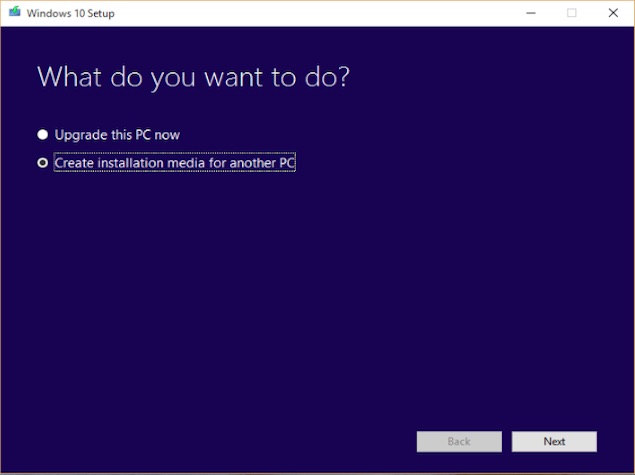
2) Once Media creation tool is installed, launch the application. When asked What do you want to do? select Create installation media for another PC, and click Next.

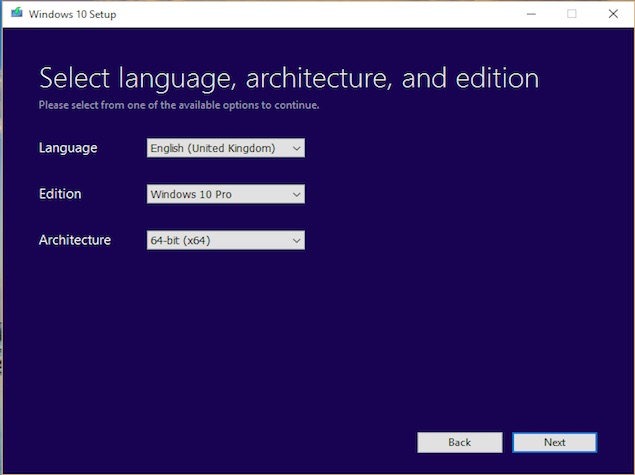
windows_10_usb_create_media_ndtv.jpg3) On the next screen, select your preferred Language and Architecture as determined in Step 1. Also choose Edition as explained below and click Next.
windows_10_usb_select_language_ndtv.jpgIf you are currently running Windows 7 Starter, Windows 7 Home Basic, Windows 7 Home Premium, Windows 8, Windows 8.1, Windows 8.1 with Bing, or Windows 10 Home, choose Windows 10 Home as Edition.
If you are currently running Windows 7 Professional, Windows 7 Ultimate, Windows 8 Pro, Windows 8.1 Pro, Windows 8 Professional, Windows 8.1 Professional with Media Centre, or Windows 10 Pro, choose Windows 10 Pro as Edition.
If you are currently running Windows 8 Single Language, Windows 8.1 Single Language, or Windows 8 Single Language with Bing, choose Windows 10 Home Single Language as Edition.
If you are currently running Windows 8 Chinese Language Edition, Windows 8.1 Chinese Language Edition, or Windows 8 Chinese Language Edition with Bing, choose Windows 10 Home China as Edition.
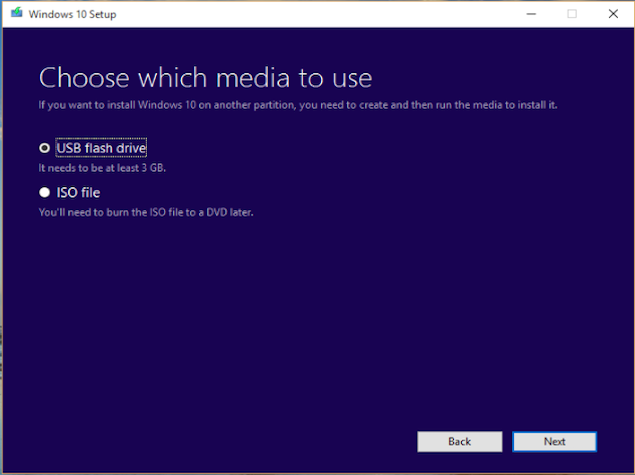
4) If you are creating a bootable Windows 10 USB disk, select USB flash drive and click Next to follow the rest of the steps. A reminder once again you will lose whatever data is there in the drive you select.
windows_10_usb_select_media_ndtv.png
If you want to create a bootable Windows 10 USB DVD, select ISO file. Make sure you have ISO file of the Windows 10 version you selected in step 3 handy. ISO files are basically images of the setup files, and the Windows 10 ISO files are available from Microsoft
Once Windows 10 media creation tool has finished doing its job, you should have a Windows 10 bootable USB disk/ DVD drive, depending upon the option you chose.
If you have problems with any of the above steps, you try using the Windows USB/ DVD Tool, which was designed for Windows 7, but handles Windows 10 just fine. You can use this guide in case you need any assistance with that, just use Windows 10 ISO files instead.

Thursday, 23 July 2015


Configuring Windows Deployment Services over a LAN

               Windows Deployment Services is the updated and redesigned version of Remote Installation Services (RIS). It enables you to deploy Windows operating systems over the network
                You need to have Windows Server 2008 or Windows Server 2003 SP2 to deploy the WDS server. Also, make sure your Active Directory and DNS are up and running. DHCP server should be authorized by Active Directory on your network. Linux DHCP servers do not need to be authorized by AD. On the client side you need NICs to be PXE compliant (almost all network adapters that are available for several years now are PXE compliant).
Step1: First install WDS service. For this Go to roles and add this service. Next click Start, then Administrative Tools, and then click on Windows Deployment Services .
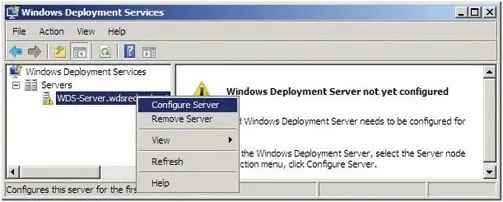
Step 2: Right-click the server, and then click on Configure Server and follow the instructions.
step2
Step3: When the configuration is completed the yellow mark on server is cleared. Now that you have configured the server, you will need to add images. Here you have to give at least two images: one boot image and the other for installation before you are able to boot WDS Server services .

step3
Step 4: To add the Install image
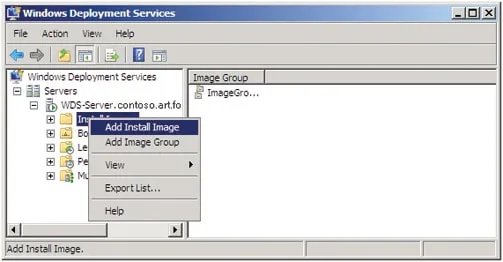
In the Windows Deployment Services MMC snap-in, right-click on the Install Images node, and then click Add Install Image.
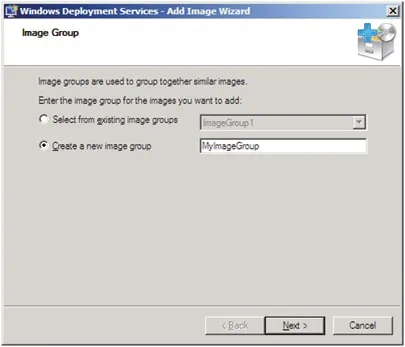
1.    Specify a name for the image group, and then click Next.

step4
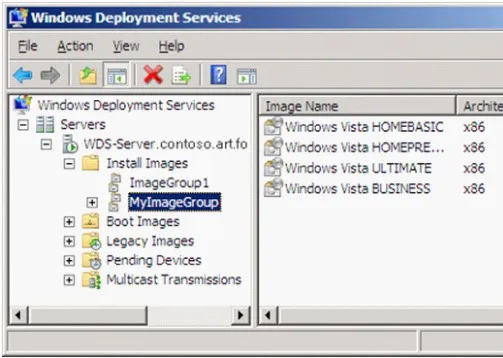
2.    Browse to select the default install image (Install.wim), which is located in the \Sources folder of the product DVD, and then click Open. Repeat this procedure to add any additional install images.

step4b
Step 5: To add boot image
1.    Browse to choose the default boot image (Boot.wim) on the product DVD which is located in the \Sources folder. Click Open and then click Next.
step5a
2.    After the above process completes, right click on the image you just added and select “Create Capture Boot Image”.
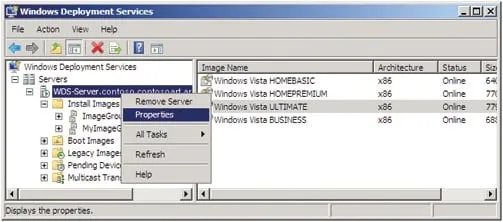
3.    If you want to change any server configuration right click on server and click on properties.
step5b

Step 6: To install an operating system on client side
step5c
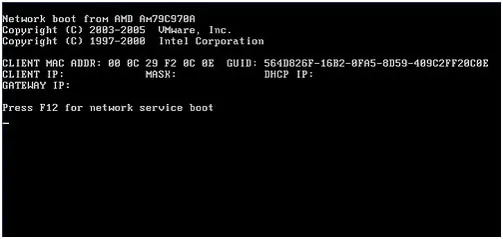
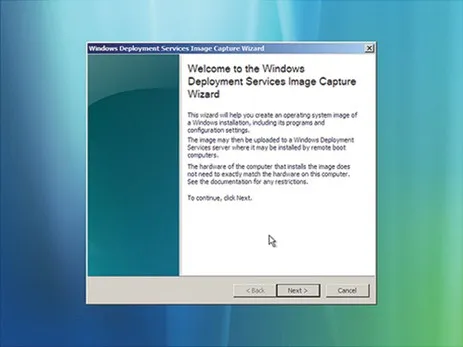
Go to BIOS of the client computer and enable PXE booting and set the boot order network first. Restart your computer and press F12 to boot and select network boot. Follow the instructions.Once it boots, it will show the Windows Deployment Service wizard from where you can easily install the boot image.

step5d

Monday, 6 July 2015


How to install X2Goserver on Ubuntu 14.04


           X2Go server enables access to the graphical desktop of a computer remotely, even over a low bandwidth connection
X2Go is a Remote Desktop solution which allows you to remotely connect to a PC. It supports all the OS whether it is Linux, Windows or Mac OS X. A key feature is that it even supports sound transmission over remote connections. Multiple users/clients can access a single X2Go Server at the same time, with each user/client having an individual Desktop session. In this case, we are using Ubuntu (server & client) and Windows 7 (client).
X2Go server Installation
Step 1: Install  X2Go server on Ubuntu 14.04 Server.
apt-get update
apt-get install python-software-properties
add-apt-repository ppa:x2go/stable
Step 2: Add PPA repository of x2Go to install x2Go server and client via repository.
sudo apt-add-repository ppa:x2go/stable
sudo apt-get update
sudo apt-get install x2goserver x2goserver-xsession
sudo apt-get install x2golxdebindings  # if you use LXDE/lubuntu
Step 3: Now, install the graphical Desktop environment in the Ubuntu Server. Run the following command and reboot.
apt-get install xfce4
reboot
X2Go connection with Ubuntu Desktop
Step 1: Now, connect the Ubuntu 14.04 server with the X2Go client from Ubuntu 14.04 desktop. Install the X2Go client in the Ubuntu Desktop as follows:
sudo add-apt-repository ppa:x2go/stable
sudo apt-get update
sudo apt-get install x2goclient
 
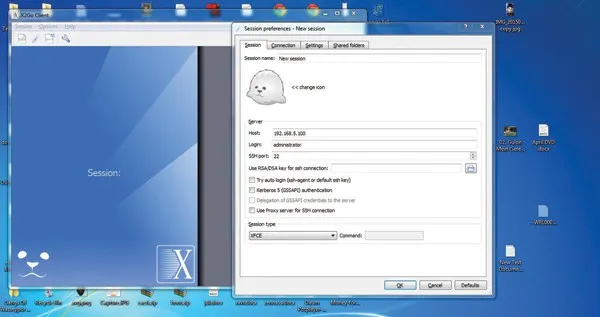
Step 2: After successful installation of the client, open the X2Go client in the desktop and give the following details:
Session name: New session (any name)
Host : 192.168.5.100 (Your IP)
Login : administrator (or any user on your Ubuntu Server)
SSH port : 22 ( if not altered at Ubuntu Server)
Session type : XFCE ( Graphical environment installed
in server)
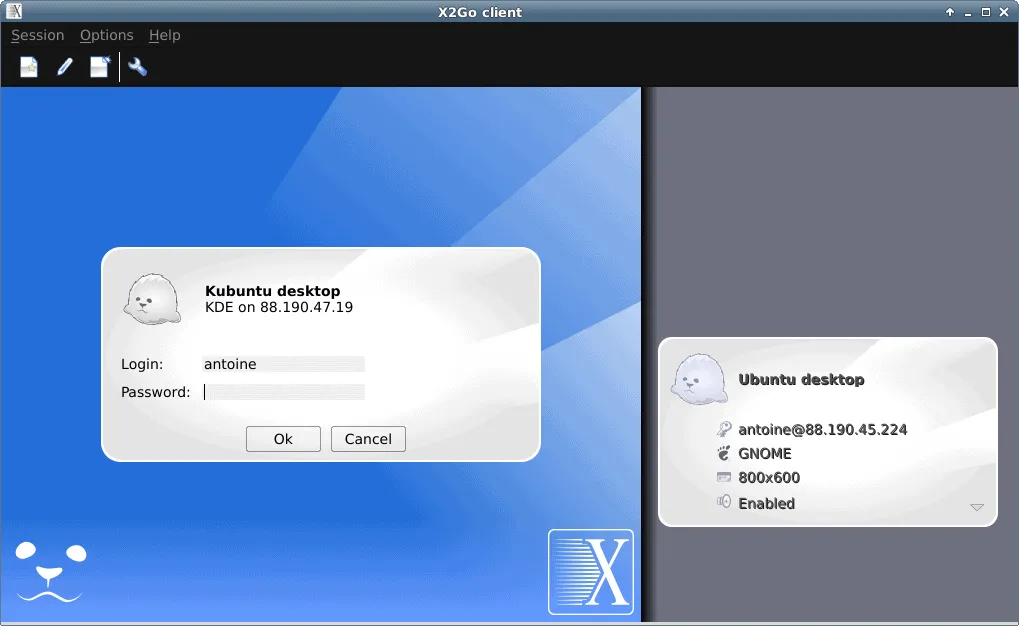
Step 4: Now, it will ask for user credentials. In this case, it is user=administrator and password=pcquest. After putting credentials, it will initiate the process of the connection and ask to authenticate the SSH key. Press Yes and press Use default config. You will get the graphical connection with the Ubuntu Server.
Remote Connection with Windows machine
Step 1: To connect with Windows 7 machine first, install the X2Go client in windows machine which is available online in the form of exe file. After the installation, run the X2Go client and give the same details which were given to connect Ubuntu server like IP, Login etc.
step-2
Step2: Put the credentials as user=administrator and password=pcquest which might be different in your case. You will get the remote desktop.
step-3